Free keyword research tool: see if a search is worth winning
Type a search and see monthly Google searches, difficulty, intent, cost per click and related keywords on one screen, so you write for what people actually type.
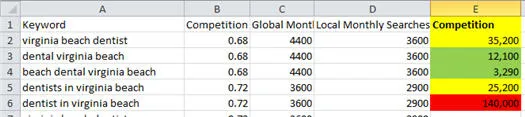
Guessing what people search wastes good pages
Most pages are written around the words a business uses. Customers often type something different, and Google ranks pages for what people search, not what we hope they search.
You can spend a day on an article and find nobody types its main phrase. Or you can aim at a search where every result on page one is a large, well-linked site.
Both feel like progress until the enquiries do not come. The fix is to check a search before you write for it, not after.
That check takes a minute with a keyword tool. You see how many people search, how hard the search is and what those people want.
What each result in the free keyword research tool means
Every search you run returns the same five results. Here is what each one tells you, in plain words, and how to use it when you choose what to write.
From a guess to a published article in four steps
Keyword research is only the start. Here is how a rough idea becomes a page that targets one clear search.
See how the article writer works
Write down your guesses
List the words your customers use, the questions they ask on the phone and the services you want more of. This is your raw list, and it is fine if it is messy.
Build a shortlist and pick one target
Run each guess through the free keyword research tool. Keep searches where the intent fits your page, people do search and the difficulty is one you can compete with. Then check page one yourself before you commit.
Turn the target into a brief
Our free SEO content brief reads the pages that rank and gives you a target length, shared topics, an outline, questions to answer and related terms to include.
Write and score the article
The AI SEO article writer reads the current top results, plans from what ranks, researches sources, drafts and edits in your saved voice. RankScore then gives a fix for each failed check before you publish.
AI content that ignores the pages already ranking wastes money. So every article starts with the search it has to win.
Questions about the free keyword research tool
Frequently Asked Questions
- Is the keyword research tool really free?
- Yes. You can run searches with no login and no card. Free use is limited each day: a few runs without an account, more with a free account and far more on a paid plan.
- How do I pick a target search from my shortlist?
- Start with intent: the people searching should want what your page gives them. Then check enough people search it and the difficulty suits your site. If two searches still look equal, cost per click often points to the one closer to a sale. Finally, look at page one and ask if you can write something more useful.
- Is this a keyword research tool for Australia only?
- No. We build SEO AI Digital in Australia and sell it worldwide, so the tool is not limited to one country. If you also want to see where your business shows in Google Maps from an Australian suburb or postcode, use our local SEO tools.
- How exact are the monthly Google searches?
- Treat them as a guide to how big a search is, not a precise count. They are most useful for comparing searches against each other, so you can see which phrasing more people use.
- What keyword difficulty should I aim for?
- It depends on your site. A newer or smaller site usually does better starting with lower difficulty searches. Check who ranks on page one too, because difficulty is a guide and the pages themselves tell you the rest.
- Will the right keyword get my page to page one?
- No tool can promise that, and we will not. The keyword tool helps you choose a search worth targeting. Whether the page ranks depends on how well it answers that search compared with the pages already there.
- Why does keyword gap analysis need an account?
- Keyword gap compares your site with your competitors and lists the searches they rank for that you do not. It needs a free account, which also gives you a higher daily limit on the free tools.
- When is my card charged if I start a trial?
- You add a card to start, but it is not charged for the plan until the trial ends. Before the first charge we show the date and the amount. Cancel before that date from the billing portal and you are not charged for the plan.
- Can I cancel a paid plan later?
- Yes, any time. The plan stops at the end of the paid period, and your articles and voice profiles stay saved.
Where to next
AI Writer
An AI SEO writer that reads page one, researches, drafts in your voice and scores each article with a fix for every failed check. Write your first one free.
Free Tools
Free SEO tools with live Google data for keyword research, page audits, backlinks, SERP checks, AI visibility and Google Maps ranks. Try one now.
SEO Audit
Run a free SEO audit on any page: title, description, headings, indexing, Core Web Vitals and speed, with a fix for each problem. Audit a page now.
AI Visibility
Check your AI search visibility: see whether Google AI Overviews or ChatGPT cite your website for your customers' questions. Start your free trial.
Local SEO
Local SEO tools to check Google Maps rankings from any Australian suburb, see who owns your name search and track directory listings. Start free.
Rank Tracker
A keyword rank tracker that follows your Google positions over time. Track a small set free, with more keywords as your plan grows. Start tracking.
Pick your target search. Then write the page that answers it.
Your card is not charged for the plan until the trial ends, and we show the charge date and amount first.